OFL Fixture
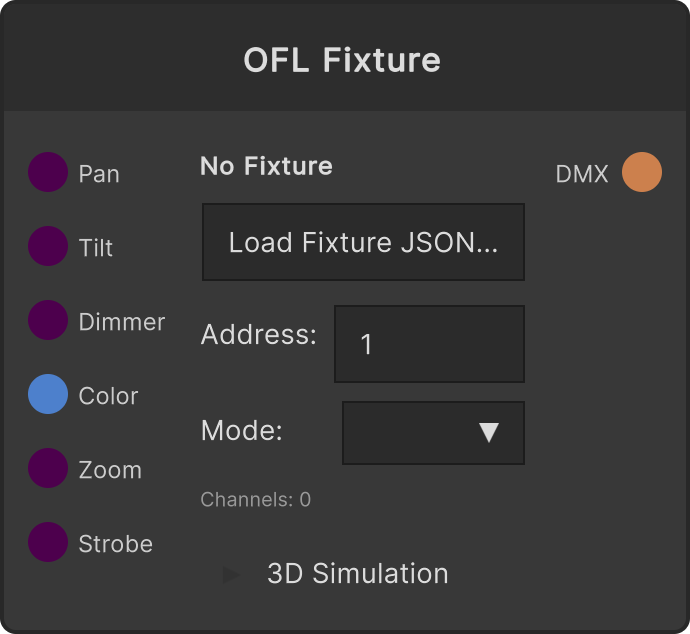
A node that loads a fixture JSON in Open Fixture Library (OFL) format and outputs the DMX frame for one fixture. Choosing a JSON with Load Fixture JSON... loads the list of modes, and each input’s value is written to the corresponding channel according to the selected mode’s channel definitions. All inputs are clamped to 0–1, and the DMX value is obtained as value × 255.
- Address — the start address. Clamped to 1–512 (converted to 0-based internally)
- Mode — chosen from the modes the fixture JSON has. The mode’s channel count is shown in the label below
- The output frame’s mask is enabled only for as many channels as the selected mode has, starting from the start address. That is why merging several fixtures with Universe does not clobber each other’s channels
- 3D Simulation (collapsible) — Position / Rotation / Scale in the simulator, plus Pan Range (default 540) / Tilt Range (default 180) / Pan Offset / Tilt Offset / Invert Pan / Invert Tilt. The values here affect only the appearance in the 3D simulator and do not change the DMX output values
Conversion by channel type
- Pan / Tilt / Dimmer / Zoom — the corresponding input mapped directly to 0–255
- Red / Green / Blue — the R/G/B components of the Color input
- Cyan / Magenta / Yellow — the inverse of R/G/B (
1 - component) - White — the minimum of R/G/B
- Color Wheel — compares the RGB distance between the color of each wheel entry and the Color input, and uses the DMX value of the closest entry
- Strobe — if the Strobe input is below 0.01, the minimum of the
Openrange in the definition; above that, a linear mapping into the min–max of theStroberange (if there is no such range, the input value is mapped directly to 0–255)
Pan Fine / Tilt Fine / Amber / UV always output 0 (16-bit subdivision and the extra colors are not implemented). On 16-bit-capable fixtures, only the coarse channel moves.
The input defaults are 0.5 for Pan, Tilt, and Zoom, 1 for Dimmer, and white for Color. Before a fixture JSON is loaded it outputs an empty frame with the mask entirely disabled, so nothing reaches downstream.
The loaded fixture JSON is saved in its entirety inside the project file. Opening it on another machine does not require the original JSON file.
Input ports
| Port ID | Type |
|---|---|
Pan | float |
Tilt | float |
Dimmer | float |
Color | Color |
Zoom | float |
Strobe | float |
Output ports
| Port ID | Type |
|---|---|
DMX Out | DMXFrame |
Scriptable members
| Path | Type |
|---|---|
panInput | float |
tiltInput | float |
dimmerInput | float |
zoomInput | float |
strobeInput | float |
Synapse Apps (scripting)
await synapse.modules.create({ type: "ofl_fixture" })