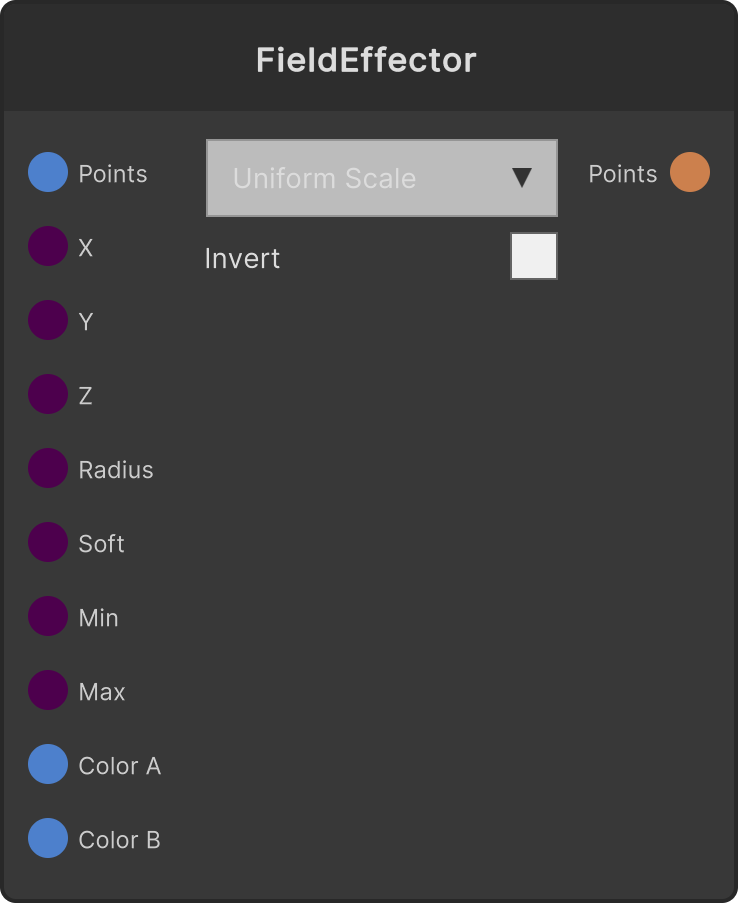
中心から Radius の球の内側で1、縁に向かって0へ落ちる重みを作り、Min〜Max に写像して選んだ属性に適用した PointCloud を出力します。芯(重み1の領域)の半径は Radius × (1 - Falloff Softness) で、そこから Radius までがグラデーションになります。中心座標をLFOなどで動かすと、変化の波が群れを掃いていきます。
- Center X / Y / Z — フィールドの中心(既定0)
- Radius(既定8、下限0.001)
- Falloff Softness — 0〜1にクランプ(既定0.5)
- Min / Max(既定 1 / 2.5)
- ColorA / ColorB — ColorGradient のみで使用
- Invert トグル — 重みを
1 - w に反転(既定オフ)
- 対象属性ドロップダウン: UniformScale(既定・スケールに乗算、下限0.001)/ ColorGradient / RotationY(写像値×360度をY回転に加算)/ PositionY(写像値をYに加算)
Falloff Softness が0のときはグラデーションにならず、ハードエッジ(半径内=1、外=0)に切り替わります。
ColorGradient は Min / Max を使わず、重みそのものを ColorA→ColorB の補間率にします。
入力ポート
| Port ID | 型 |
|---|
PointCloud | PointCloudInput |
Center X | float |
Center Y | float |
Center Z | float |
Radius | float |
Falloff Softness | float |
Min | float |
Max | float |
ColorA | Color |
ColorB | Color |
出力ポート
| Port ID | 型 |
|---|
PointCloud | PointCloudOutput |
スクリプトから設定可能なメンバー
| パス | 型 |
|---|
centerXInput | float |
centerYInput | float |
centerZInput | float |
radiusInput | float |
softInput | float |
minInput | float |
maxInput | float |
invert | bool |
Synapse Apps(スクリプティング)
await synapse.modules.create({ type: "FieldEffector" })