SpriteMaterial
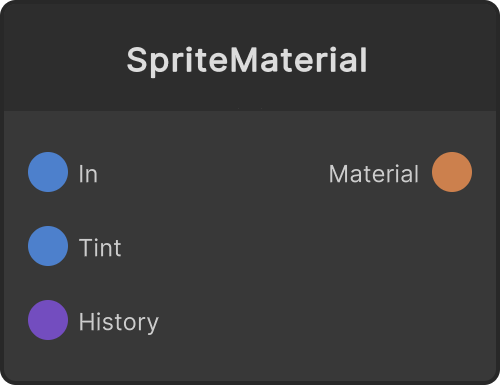
Feeds a material using the SynapseRack/SRSprite shader to the Material output. It is a material that maps the Render Texture from In straight along the mesh’s UVs, so you can build “copies of the video laid out across a point cloud” with a Quad plus CopyToPoints, or map video onto a solid such as Text 3D with Mesh Renderer. It receives neither lights nor fog, so the colors of the video come out as they are. It is not a billboard, so the plane rotates with the point cloud’s Rotation, and both sides are drawn. The point cloud color is multiplied in together with Tint.
It does not move the vertices. The aspect ratio of the video is something the mesh side takes care of: with a Quad, the Scale of the plane; with a solid, UV Project or the UV Scale below.
Notes on the ports
- Tint — the color multiplied in (HDR, default white). Alpha is multiplied too
- History — connecting a Frame Buffer (with Shader Access ON) displays, for each instance, the frame from TimeOffset in the past (0 is the newest, 1 the oldest). When it is not connected, In is mapped as is
- Opaque — OFF (default) is translucent (alpha blending, no depth write, drawn after the opaque pass). Turning it ON writes depth, does not blend, discards alpha below 0.5 and draws it as opaque. When mapped onto a closed solid, the faces behind stop showing through from the side. The smoothness of translucent edges is lost
- UVOffsetX / UVOffsetY (labeled UV Offset X / Y on the node) — the UV shift (default 0)
- UVScaleX / UVScaleY (labeled UV Scale X / Y) — the UV multiplier (default 1). Above 1 the video repeats
- UVRotate (labeled UV Rotate) — the UV rotation (in degrees, default 0)
The UV transform is applied in the order scale about the center → rotate → offset, and whatever spills outside repeats (drive it with an LFO and you get scrolling or tiling). The order and the direction of rotation are the same as in UV Project.
Pixels whose alpha is nearly 0 are not drawn. When translucent, the front-to-back order of overlaps follows the order of the points (later points are in front).
Input ports
| Port ID | Type |
|---|---|
Render Texture | RenderTexture |
Tint | Color |
History | FrameBufferInput |
Opaque | bool |
UVOffsetX | float |
UVOffsetY | float |
UVScaleX | float |
UVScaleY | float |
UVRotate | float |
Output ports
| Port ID | Type |
|---|---|
Material | MaterialOutput |
Scriptable members
| Path | Type |
|---|---|
opaqueInput | bool |
uvOffsetXInput | float |
uvOffsetYInput | float |
uvScaleXInput | float |
uvScaleYInput | float |
uvRotateInput | float |
Synapse Apps (scripting)
await synapse.modules.create({ type: "SpriteMaterial" })