Countdown
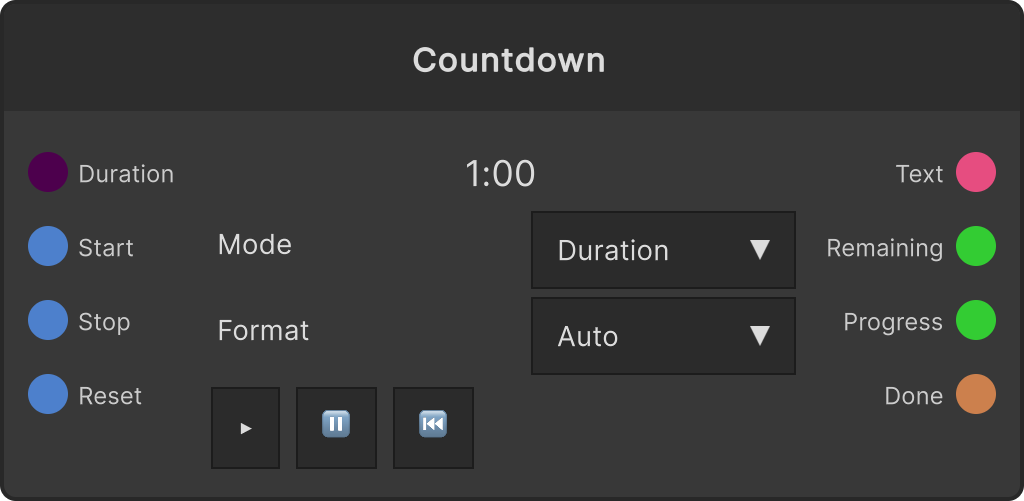
A node that supplies the remaining time as a string and as numbers. It does not draw anything, so for display you send it to something like Text Render. You choose between two ways of counting with the Mode dropdown.
Duration mode (default)
It counts down the number of seconds given by Duration. The seconds are set either in the field on the node or through the Duration port (default 60 seconds, clamped to 0-359999 seconds = 99:59:59, at most one connection).
- Start — starts the count. Only a Start after a Stop resumes from the remaining time; a Start while it is running, after Done, or with 0 remaining starts over from full
- Stop — pauses
- Reset — returns it to full and stops. This is also what re-arms Done
- Changing the seconds while it is stopped makes the display follow on the spot. Changing them while it is running does not affect the current count; it takes effect from the next Reset or Start
- Timing uses real time rather than accumulated frame time, so the display does not drift away from real time even when a heavy patch drops frames
The node also has ▶ (Start) / ⏸ (Stop) / ⏮ (Reset) buttons.
Clock mode
It counts down to a specified time on the wall clock. Setting Mode to Clock makes the Time field appear (hidden in Duration mode).
- The time format is 24-hour
h:mm/h:mm:ss/hh:mm/hh:mm:ss(for example22:30,9:05:00). Commit with Enter or by clicking outside the field - If the specified time has already passed today, it aims at the same time the next day
- Start / Stop have no effect; it always keeps running. Reset re-takes the target time, and is what you use to aim at the same time the next day after Done has fired
- When the string cannot be interpreted as a time, it stays stopped at 0 remaining and Progress 1, and Done does not come out either
Durationis not used in this mode
The Format dropdown
- Auto (default) — minutes:seconds if less than an hour remains, hours:minutes:seconds from an hour up
- mm:ss — always minutes:seconds
- hh:mm:ss — always hours:minutes:seconds
- Seconds — just the number of seconds remaining
The leading unit is not zero-padded (you get 9:05, 1:02:03). The display rounds up, so 0.3 seconds remaining reads 0:01, and 0:00 coincides with the instant it arrives.
Notes on the outputs
- Text — the string for display. It only flows at the instant the second changes
- Remaining — the seconds remaining. It never goes below 0
- Progress — 0 is just after the start and 1 is arrival (it increases 0→1). The denominator is the specified seconds in Duration mode, and in Clock mode the seconds from the moment the target time was re-taken to the target. In other words, Progress in Clock mode is “how far it has come since the Reset”
- Done — once only, at the instant the remaining time reaches 0. It does not fire again until a Reset (a re-arm in Clock mode). It does not come out while the count is not moving (stopped in Duration mode, or an invalid time in Clock mode)
Where to use it: plug Progress into the size or the color of the text and you get “bigger and redder the closer the end is”. Done works as the cue for switching scenes or starting playback of the main show.
Input ports
| Port ID | Type |
|---|---|
Duration | float |
Start | trigger |
Stop | trigger |
Reset | trigger |
Output ports
| Port ID | Type |
|---|---|
Text | string |
Remaining | float |
Progress | float |
Done | trigger |
Scriptable members
| Path | Type |
|---|---|
durationInput | float |
currentMode | int |
currentDuration | float |
currentTargetTime | string |
currentFormat | int |
Synapse Apps (scripting)
await synapse.modules.create({ type: "Countdown" })