Clock Text
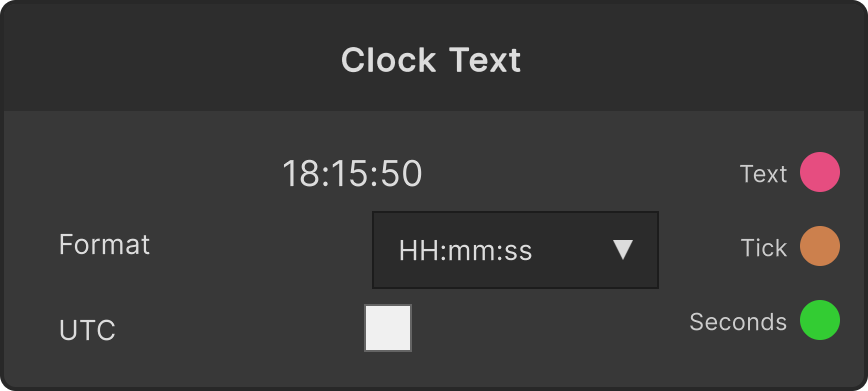
A node that supplies the current time as a string. It does not draw anything, so you send it to something like Text Render to use it. It has no input ports.
Format (the Format dropdown)
- HH:mm
- HH:mm:ss (default)
- yyyy/MM/dd
- yyyy/MM/dd HH:mm
- hh:mm tt
- Custom — selecting it makes a format field appear below (hidden for anything other than Custom)
In the Custom field you write a format string in the same notation as the presets (HH the hour in 24-hour form, hh the hour in 12-hour form, mm minutes, ss seconds, yyyy/MM/dd year/month/day, tt AM/PM, and so on). Input is committed with Enter or by clicking outside the field. While the string you have entered cannot be interpreted as a format, the node shows that the format is invalid and Text holds its previous value.
Day names and the AM/PM notation do not depend on the language setting; they are always in English notation (AM / PM and so on).
- UTC toggle — ON for Coordinated Universal Time, OFF (default) for the PC’s local time
Notes on the outputs
- Text — the time string with the format applied. It only flows when the string changes (with a format that has no seconds in it, such as
HH:mm, it does not flow until the minute changes). Right after you switch the format or UTC it is emitted again immediately - Tick — fires once every time the second changes. Tick comes out every second even with a format where
Textdoes not change - Seconds — the seconds elapsed since midnight of that day (0-86400). The same timing as Tick, that is, it updates every second
Where to use it: the per-second Tick works as “a beat once per second” even at a venue that has no tempo, so you can drive blinks or counters with it.
Input ports
None
Output ports
| Port ID | Type |
|---|---|
Text | string |
Tick | trigger |
Seconds | float |
Scriptable members
| Path | Type |
|---|---|
currentPreset | int |
customFormat | string |
currentUtc | bool |
Synapse Apps (scripting)
await synapse.modules.create({ type: "ClockText" })