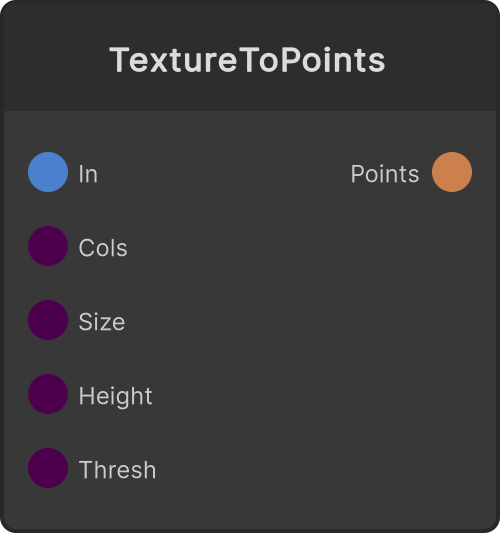
Downscales the received RenderTexture to a low resolution, reads it back from the GPU, and outputs a point cloud with one point per pixel. Each point’s color is that pixel’s color, and Z rises in the -Z direction (toward the viewer as seen from the default camera) according to brightness. Pixels darker than Luma Threshold produce no point at all, so raising the threshold gives a sparse point cloud in which only the bright parts remain. Because reading back from the GPU is asynchronous, it lags the video by 1–2 frames.
- Columns — the number of horizontal divisions (default 64, clamped to 8–160). The number of vertical divisions is calculated automatically from the input RT’s aspect ratio (minimum 2)
- World Width — the world-space width of the whole point cloud (default 20, minimum 0.1). The size of one cell is this divided by Columns
- Relief Height — the amount of rise at brightness 1 (default 4)
- Luma Threshold — clamped to 0–1 (default 0). Brightness is
0.299R + 0.587G + 0.114B
Disconnecting the input RT makes the point count 0.
Input ports
| Port ID | Type |
|---|
Render Texture | RenderTexture |
Columns | int |
World Width | float |
Relief Height | float |
Luma Threshold | float |
Output ports
| Port ID | Type |
|---|
PointCloud | PointCloudOutput |
Scriptable members
| Path | Type |
|---|
columnsInput | int |
sizeInput | float |
heightInput | float |
thresholdInput | float |
Synapse Apps (scripting)
await synapse.modules.create({ type: "TextureToPoints" })