MIDI LED
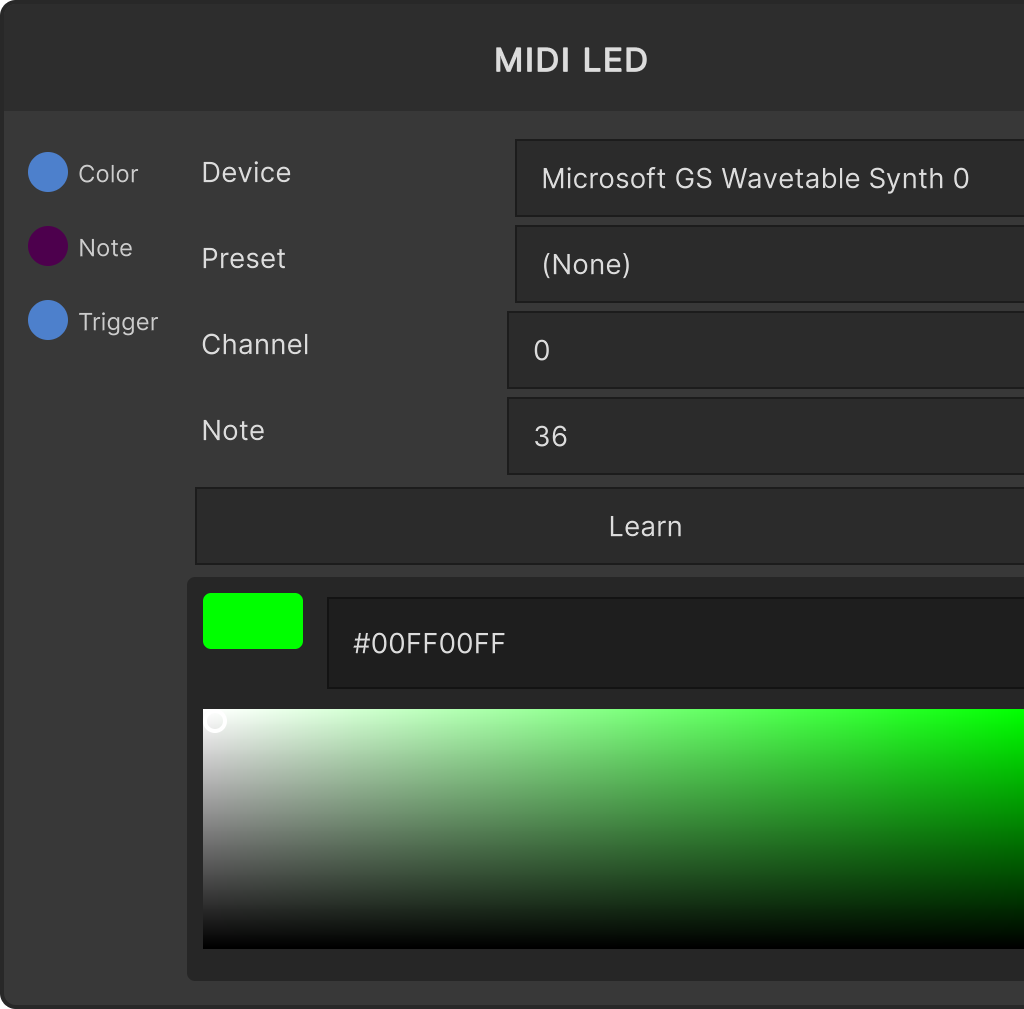
A node that controls the LEDs of a MIDI controller with RGB pads by color from the graph. It converts the color arriving at Color into a velocity value and sends it as NoteOn to the specified Channel / Note. It sends when Color changes and when Trig fires.
- Device — the destination device (kept by name; focusing it rescans the list)
- Preset — the color palette definition for each model. When you select one, it compares the RGB distance between the input color and each palette color and sends the velocity number of the closest color
- Channel — clamped to 0–15 (default 0)
- Note — clamped to 0–127 (default 36)
- Learn — press it and then hit a pad to capture that NoteOn’s Channel / Note
- The color picker on the node lets you set the color directly for when nothing is connected (the default is green)
Leaving Preset as
(None)does not reproduce the color. With no preset, it simply sends the color’s brightness (grayscale) × 127 as the velocity, so a color unrelated to the model’s palette numbers lights up.
Presets work by reading the JSON in
StreamingAssets/MidiPresets/at startup, and the one bundled is APC40mkII. You can add other models by adding JSON.
A change in the value connected to the
Noteinput does not by itself send anything (it only updates the note number). After changing the number, send it withTrig.
Input ports
| Port ID | Type |
|---|---|
Color | Color |
Note | float |
Trig | trigger |
Output ports
None
Scriptable members
| Path | Type |
|---|---|
noteInput | float |
currentDeviceName | string |
currentPresetName | string |
currentChannel | int |
currentNote | int |
Synapse Apps (scripting)
await synapse.modules.create({ type: "midi_led" })