TextSplit
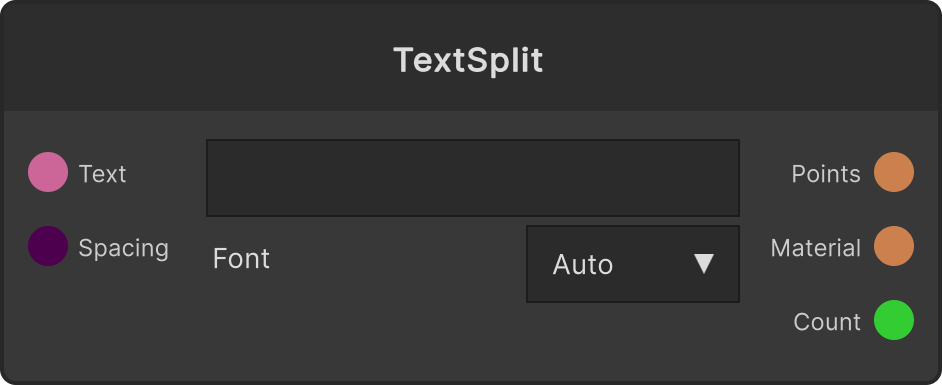
Splits the string you enter into one point per character and outputs PointCloud / Material / Count. Since one point corresponds to one character, nodes meant for point clouds such as Point Key / Wave / Attribute / SpringPoints become character animation as they are. This node itself has no animation.
- You enter the body text directly into the text field on the node. Once you connect the
Textport, the string coming from there becomes the body text from then on - Line breaks are replaced with spaces, and the text is always folded into a single line
- The limit is 128 characters. Anything beyond that is truncated, and a warning is printed to the console at that point
- Emoji and combining characters are counted as one character
Countoutputs the number of characters actually emitted (for uses such as deciding Wave’s Stagger from the character count)
Layout
The points are lined up in a single horizontal row at a fixed pitch, with the center of the whole row at the origin. Spacing (default 1) is the interval between adjacent characters. Full-width characters line up evenly, but Latin text is laid out at the same interval without regard to glyph width, so adjust the tightness with Spacing. Rotation is none, scale is 1, and color is white on output; anything beyond position is the job of the downstream nodes.
Font
Chosen from a dropdown. The default Auto automatically looks for a font that can display Japanese. Apart from that, the bundled fonts and the fonts installed on the OS are listed. The characters are re-baked only when you change the body text or the font.
Material output
Material is a material that pastes the glyph corresponding to “which character index this point is”. Connect a plane (Primitive’s Quad) to CopyToPoints’s Mesh, this node’s PointCloud to Points, and this output to Material, and the string is displayed laid out in a row. It uses double-sided drawing and alpha blending, so the parts with no glyph are transparent. If you multiply the copies with SceneRepeat, each copy draws the string again from the beginning.
Input ports
| Port ID | Type |
|---|---|
Text | string |
Spacing | float |
Output ports
| Port ID | Type |
|---|---|
PointCloud | PointCloudOutput |
Material | MaterialOutput |
Count | int |
Scriptable members
| Path | Type |
|---|---|
textInput | string |
spacingInput | float |
textValue | string |
fontName | string |
Synapse Apps (scripting)
await synapse.modules.create({ type: "TextSplit" })