MIDI Note In
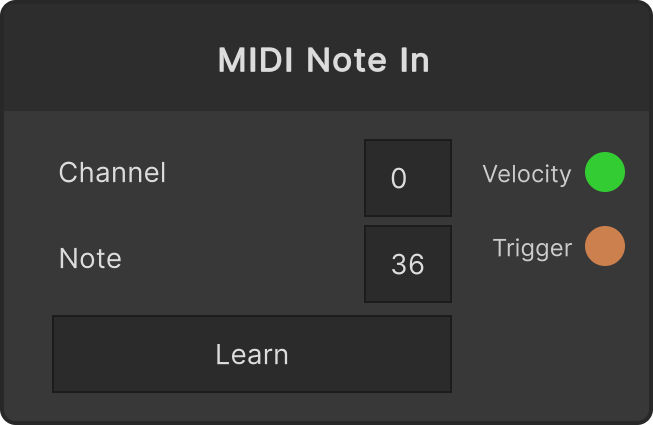
A node that brings notes from pads or keys into the graph as a signal source. When it receives a NoteOn where both the configured Channel and Note match, it outputs the velocity to Velocity as 0–1 (the received value ÷ 127) and fires Trigger at the same time. When it receives a NoteOff, Velocity returns to 0, so it can also be used directly as a gate.
- Channel — clamped to 0–15 (default 0)
- Note — clamped to 0–127 (default 36)
- Learn — press it and then hit a pad; that NoteOn’s Channel / Note are captured and learning ends automatically. Press it again to cancel
There is no device selection. It picks up matching notes from every enabled MIDI input device. When you want only one particular controller to respond, disable the others with the MIDI input device toggles in the system settings.
A NoteOn with velocity 0 is treated as a NoteOff (
Velocitybecomes 0, andTriggerdoes not fire).
Input ports
None
Output ports
| Port ID | Type |
|---|---|
Velocity | float |
Trigger | trigger |
Scriptable members
| Path | Type |
|---|---|
currentChannel | int |
currentNumber | int |
Synapse Apps (scripting)
await synapse.modules.create({ type: "midi_note_in" })