Curve
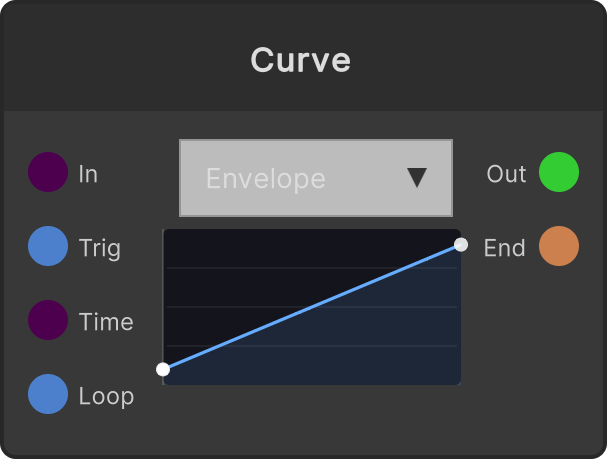
A node that lets you use a 0-1 function, built by dragging points directly in the editor on the node, in two ways. The curve itself is the same single curve in both modes; only what you feed into its horizontal axis differs.
- Envelope (default) — when Trigger arrives, plays the curve from the start over Duration seconds and outputs to Value. Fires On Complete at the end
- Shaper — uses the In value directly as the curve’s horizontal axis and outputs the bent result. A non-linear version of Remap
Parameters:
- Duration default 1 second (internally floored at 0.0001 seconds)
- Loop — carries the amount that goes past the end over into the next cycle, so the period does not drift even if frames are dropped. On Complete fires on every cycle
- The initial curve is the two points (0,0)–(1,1). Interpolation is monotone cubic (Fritsch–Carlson), so it never goes outside 0-1 between points
In Shaper mode, In is clamped to 0-1, and Trigger / Duration / Loop are not used. If the input stops, the output stops too.
Video
Input ports
| Port ID | Type |
|---|---|
In | float |
Trigger | trigger |
Duration | float |
Loop | bool |
Output ports
| Port ID | Type |
|---|---|
Value | float |
On Complete | trigger |
Scriptable members
| Path | Type |
|---|---|
inInput | float |
timeInput | float |
loopInput | bool |
Synapse Apps (scripting)
await synapse.modules.create({ type: "Curve" })