WebCamera
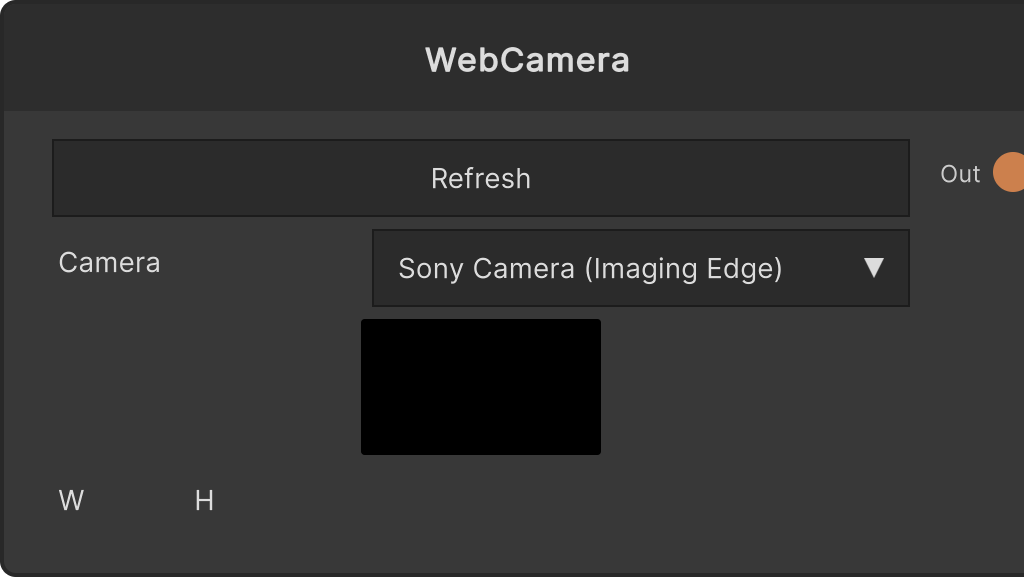
A node that brings in webcam video. Selecting a device in the dropdown starts capture, and the output RT is rebuilt at the resolution the camera actually returned (which does not necessarily match what was requested).
W/Hrequest the resolution (default 1280×720, FPS 30). Changing the values restarts a camera that is already running- Choosing None stops the camera and clears the output to black
- The Refresh button re-fetches the device list. When nothing is selected, it does not auto-connect to the first camera
At startup it first obtains camera permission with
RequestUserAuthorizationand then enumerates devices. This is because on macOS the device list stays empty and the video stays black unless permission is obtained, and if permission is denied the list stays empty (Windows works without permission, so there is an OS difference).
Input ports
None
Output ports
| Port ID | Type |
|---|---|
RenderTexture Output | RenderTexture |
Scriptable members
| Path | Type |
|---|---|
currentDeviceName | string |
requestedWidth | int |
requestedHeight | int |
requestedFPS | int |
Synapse Apps (scripting)
await synapse.modules.create({ type: "WebCamera" })